How to Plan a Minecraft Circle Door Frame in Java Edition
Plan a Minecraft circle door frame in Java Edition: separate frame and opening sizes, align the floor, and reserve space for a standard wooden door.
On this page
In the realm of Minecraft, where creativity knows no bounds, constructing intricate structures is an art form. One such endeavor involves designing a circle door frame that combines both functionality and aesthetics. This guide delves into the detailed process of planning this unique architectural feature within the Java Edition of the game.
How a Minecraft Circle Door Works
At its core, a circular entrance serves as a stationary decorative frame that encircles a manually operated barrier. In Java Edition, this barrier takes the form of an ordinary wooden door within a two-dimensional vertical wall. Players interact with this barrier by opening or closing it to control entity movement through the doorway. The frame itself is independent of the actual door, requiring players to open and close the door manually.
Planning a circle door frame begins with defining its dimensions. For any circular pattern, the outer span must be clearly defined. However, for our purposes, the clear opening will be reserved within the full block span of the circle. As the full block span may either be an odd number (where the center lies on a single block) or even (where the center is between two adjacent blocks), we’ll mark the center of the planned circle. With the door position now marked within the planned opening, the next step is to choose a blueprint for the circle itself.
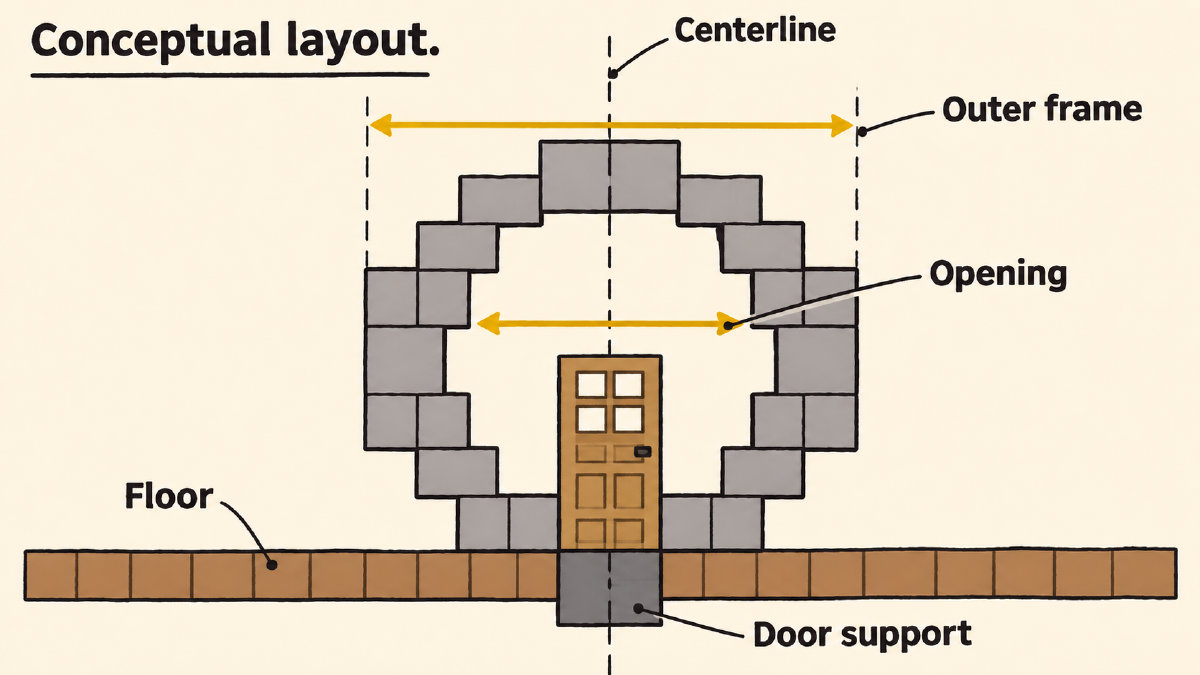
Transferring a chosen circle blueprint onto the wall requires careful attention to detail. A block-by-block blueprint provides precise instructions for each row of the wall, allowing us to determine how many rows we need to place the circle. We then record each corresponding left and right positions around the marked center. Finally, we record all changes necessary for the entrance floor edits separately, which are applied as changes to the circle template.
Choose the Walking Floor and Door Space
Choosing the walking floor determines the threshold, door space, and any necessary changes to the bottom curve of the frame. Once you choose your walking floor, it forms a solid supporting face beneath the door. Your door should have its lower half at the targeted placement position above the supporting floor and its upper half one block above it. You should reserve both of these door positions. Any bottom-curve cells occupying the reserved door positions will be removed, and those changes will be recorded. If there isn’t enough room for both halves of the door, or if the supporting face isn’t suitable, the door will fail to be placed.
Once you’ve completed your circle’s layout, you can assess whether there is a usable passage through the circle at floor level and whether it passes through the door height. To see what your walk-through looks like, I recommend doing so after placing your circle. Normally, the player bounding box is 1.8 blocks high, and the player is 0.6 blocks wide. Blocks with collision boxes govern blocked movement, which governs what parts of the player’s body get blocked during movement. What you’ll see is the actual walking floor you chose, along with both door-height positions.
The widest circle row alone is not sufficient to establish a passage. That would simply be a narrow gap through the center of the circle, but the wider circle row would provide a much larger passageway. Therefore, I highly recommend doing an in-game walk-through after placing the circle. The circle will only be considered complete once you’ve placed its blocks according to the chosen circle template and applied the recorded doorway edits.
Recalculate Your Frame Materials
To recalculate your frame materials, you’ll start by taking your selected blueprint and the material count associated with it as your starting reference. Any frame cell that was retained in the original blueprint will be counted toward your total. You’ll subtract out any entrance cells that were removed. Then, you’ll add any new frame cells that were added back in. Be sure to count your floor support separately from the rest of your frame; they are not part of the frame. You’ll also need to include a door item separately from the frame materials, as well. Ultimately, the finished total is dependent on a complete doorway layout being placed correctly.
In summary, planning a circle door frame in Java Edition involves a meticulous process of selecting and modifying blueprints, accounting for dimensional requirements, and ensuring structural integrity. By following these steps, you can create a functional and visually appealing circle door frame that enhances your Minecraft experience.