Build a Semi Circle Minecraft Players Can Copy From a Circle Plan
Plan a semi circle Minecraft build from a full-circle grid, handle odd and even centers, and count the curved edge and optional base.
On this page
To build a single-layer semi circle Minecraft players can copy, you’ll need to create a circular blueprint that is symmetric in shape. You’ll then select a specific half of the circle and copy it to another location, as shown in the diagram below. If your full-circle blueprint has even-length sides, there will be an axis between the rows or columns, which are essentially invisible lines that divide each side into two equal parts. If your blueprint is odd-length on either side, there will be a middle row or column.
In this case, the blueprints have even-length sides (20 squares). A cut was made between rows 10 and 11, which resulted in both sides of the blueprint having 10 retained rows. For odd-length sides, such as a 21-square blueprint, there would have been one middle row: row 11. This row would then result in both halves of the layout retaining 11 rows, with the middle row shared by both possible inclusive halves. When using vertical cuts to make a horizontal shape, the same arithmetic applies to the columns instead of the rows.
You may also choose a filled blueprint, where the interior of the shape is included in the pattern. The key difference between an outline blueprint and a filled blueprint is that an outline blueprint has only the curved boundary, while a filled blueprint includes the interior. In addition, a closed outline blueprint adds a straight base to the shape.
Manually counting the blocks required for any given layout can quickly become cumbersome, especially if you want to build the same layout multiple times or use the same layout for different sizes. However, it’s a necessary part of building a layout from scratch.
The most important thing when working with a circle plan is that the center line must be marked. There are many different ways to do so; the following example uses grid coordinates. Remember that one grid square equals one Minecraft block, so it’s best to measure how much space the entire plan requires before placing any blocks.
How to Measure an Inclusive Span
If you’ve created a circle layout, it should consist of both ends. As an example, imagine a circle that spans from coordinate 5 to 10 — those coordinates represent the beginning and end points of the span, meaning there are six blocks along that length. In Minecraft, the number of blocks that a particular layout requires will usually vary based on the shape being copied.
For example, a circle layout that is 20 blocks wide (a 20-block square) could easily be divided in half, resulting in two symmetrical 10-block shapes. That doesn’t necessarily mean that each of these layouts would require exactly 10 blocks, however. A circle layout that measures 21 blocks across (a 21-block square) would have a single center block, making it easier to work with.
This brings up a question: how does Minecraft handle inclusive spans? The answer is simple: it depends on how you count. An inclusive span is one that includes both endpoints of the original span. So, a layout that spans from block 5 to block 10 would consist of six blocks along that length. The reason? Both endpoints count. But when we cut the layout between rows 10 and 11, that cut separates the layout into two equal halves. Each side retains 10 rows.
So what about a 21-square layout? How does that break down? It turns out that it’s quite simple: it consists of a single center block. Then, it simply divides the remaining blocks evenly between the other two sides of the layout. Therefore, when creating an odd-shaped layout, the cut would be made at the center of the original layout. That makes the most sense: the middle row is shared by both inclusive halves.
Retained Layouts
One way to build a new layout is to retain some blocks from the existing layout. You can choose either an arc (curved boundary) layout or a closed outline layout. An arc is basically the curved boundary of the circle. A closed outline includes both the arc and a straight base. For the 20-row blueprint, place the base along row 10 if you retain the upper half, or row 11 if you retain the lower half. The cut itself lies between those rows, so it doesn’t provide a row of blocks for the base. In addition, you can also choose to fill in the interior of the circle (the filled layout).
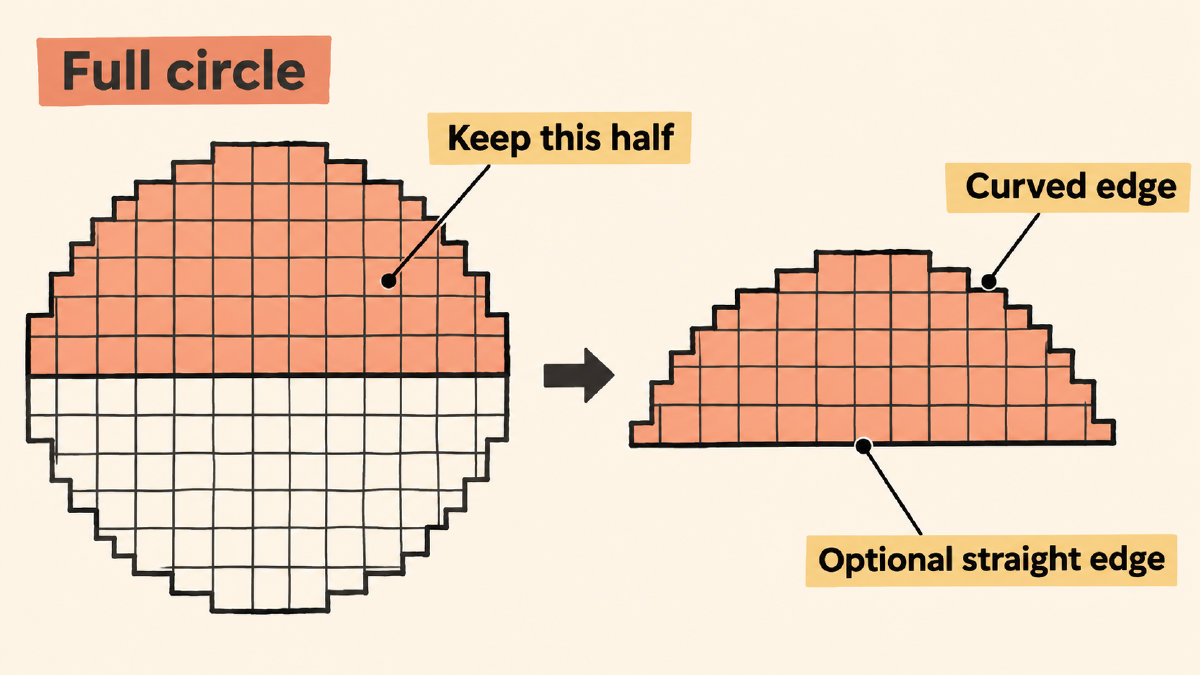
A filled layout includes all the interior blocks, so that’s a bit trickier. A good way to think about the filled layout is that it’s like a filled circle in a spreadsheet: you’re including the interior blocks and the curved boundary, too. If you choose to retain the filled layout, that means that every occupied square is retained. In short, you’ll be filling in all of the squares in the arc of the circle.
It might help to count each type of layout separately. For an arc, count the curved boundary blocks. For a closed outline, count the arc plus any straight-edge blocks not already counted. For a filled layout, count the boundary and all of the interior squares as well.
Counting Blocks Manually
You’ll need to manually count the blocks that go into your final layout, depending on what you want to do with them. It’s a quick process, though: you can simply count the number of blocks in the arc, then add the straight base (if needed), and finally the interior squares. Keep in mind that for a symmetric even-span arc or filled layout cut between the middle rows or columns, you can take half of the full-circle tool total. Count any extra blocks for a straight base separately. For an odd-span layout that includes the middle row or column, you won’t be able to just take half of the full-circle tool total.
That’s because the symmetry of the circle means that the middle-row or middle-column blocks will be used in both halves of the layout. By dividing the full-circle total by two, you’re likely going to undercount one of the halves, because it contains the blocks shared between both halves.