How to Find Area of a Circle Using Diameter for Minecraft
Learn how to find area of a circle using diameter, work through a 10-block example, and distinguish floor estimates from exact blueprint counts.
On this page
Minecraft players who have tried to calculate the area of their circular plots have found that calculating the diameter, then finding the radius, and plugging it into the standard circle area formula is one thing. But they might not be aware that the same calculation can be done directly from the diameter instead. And they certainly might not know how to do it.
How to find area of a circle using diameter
When we’re working with circles, the diameter goes through the center of the circle, from one edge to another. This diameter is twice the length of the radius, which means that if you know the diameter, you can find the radius by dividing it in half. The formula for a circle’s area using radius r is A = πr². That same calculation can also be expressed in terms of the diameter d as A = π(d/2)² = πd²/4.
So when we are given the full diameter, the steps to solve the area of the circle would be:
Take the diameter and divide it by two. This will give us the radius.
Then square the result. This is where some people make an error. It’s important to remember that squaring the radius doesn’t mean just doubling the radius value. Instead, we need to multiply the value by itself, or raise it to the power of 2.
Finally, we need to multiply this squared value by π (pi), approximately 3.14159.
A circle with a diameter of 10 blocks
Let’s work through a floor-planning example to help visualize this. Let’s say our circle has a diameter of 10 blocks, so the radius is 10 divided by 2, or 5 blocks. Plugging this into the area formula gives us:
A = π × 5² = 25π
The exact geometric answer here is 25π square blocks, but we can approximate this value numerically. Since π is approximately 3.14159, we can plug that value into the equation:
A = 3.14159 × 25 = 78.54 square blocks
In this example, we’ve converted our diameter into radius units, and then solved the problem accordingly. Remember that diameter and radius are measured in blocks, while area uses square units, so the resulting area is measured in square blocks. If your circle is 10 blocks in diameter, the area is roughly 78.54 square blocks. However, you’ll want to keep the exact geometric solution, since there’s no verified blueprint block total to establish whether this estimate is correct. Rounding 78.54 to 79 doesn’t tell us how many blocks we’ll need either. That depends on which grid squares we choose to include in our layout.
Counting materials for a circular plot
But what does this mean when building? How does it affect how many materials we should gather for our circular plot?
It turns out that selecting grid squares in your game world creates a block-based approximation of a continuous circle. By doing this, we convert our continuous, unbroken circle into a series of chosen blocks that make up the layout of our design. One approach to this is to build a filled floor; this requires you to count every single occupied cell across each row that forms part of the filled-floor. Each individual cell corresponds to a material placement, so adding them up provides a rough idea of the amount of materials you’ll need to build up a solid, filled floor. For a one-layer floor with one block per occupied cell, though, adding up all the filled row lengths gives us the exact material count for that layout.
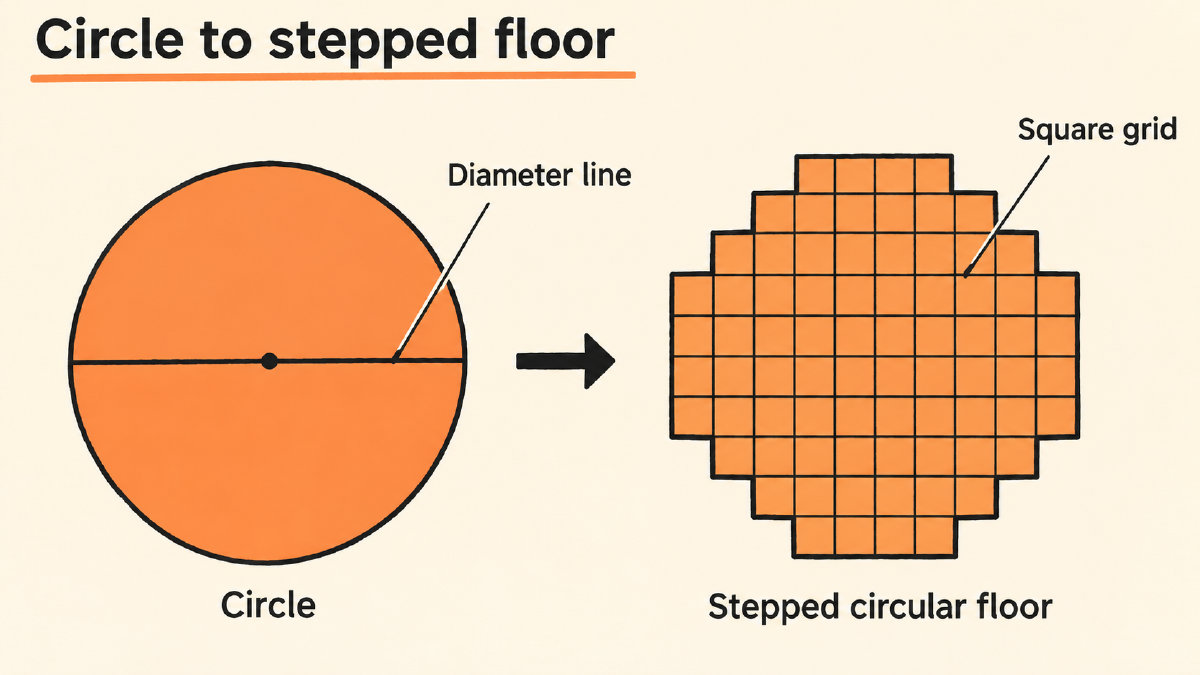
However, when choosing an option to place blocks around an outline, each occupied cell corresponds to one block you’ll need to construct that outline. In other words, the filled-floor material count isn’t exactly equivalent to the outline option. The difference between the two options becomes evident when comparing how many materials either option consumes. A simple rule is: a generator is used to determine the size, and the material count is calculated accordingly.
Checking a blueprint’s block total
There’s nothing stopping you from trying to use a site’s circle-building example, where a 21 x 21 blueprint is generated, and then you place 56 blocks on top of it. You can even add prescribed gaps in between. We can check the placements and gaps against the numbered row instructions, compare mirrored rows, and count the occupied squares to confirm the plan’s 56-block total. As such, the displayed blueprint dimensions won’t necessarily correspond to either a unique continuous geometric boundary or the total number of blocks used to fill the entire surface.